
You upload a course intro video or a product demo to Google Drive, set the sharing to “Anyone with the link,” copy the embed code, and paste it into your website. The video plays in your browser. It looks fine.
It is not fine.
Google Drive is cloud storage, built to share documents and spreadsheets between collaborators. It was not designed to deliver video to anonymous website visitors at scale from edge servers close to the viewer. When you use it for video hosting, you inherit every limitation of file storage: slow delivery, no reliability guarantees, no privacy controls, and a sharing model Google can revoke without notice.
What Google Drive Actually Does When You Share a Video
When you share a video from Google Drive, Google generates a link to its file delivery infrastructure. Hit play, and one of two things happens. If you used the Drive embed iframe, Google streams the file from its servers through a lightweight viewer. If you used a direct link, the file downloads progressively from Google’s origin.
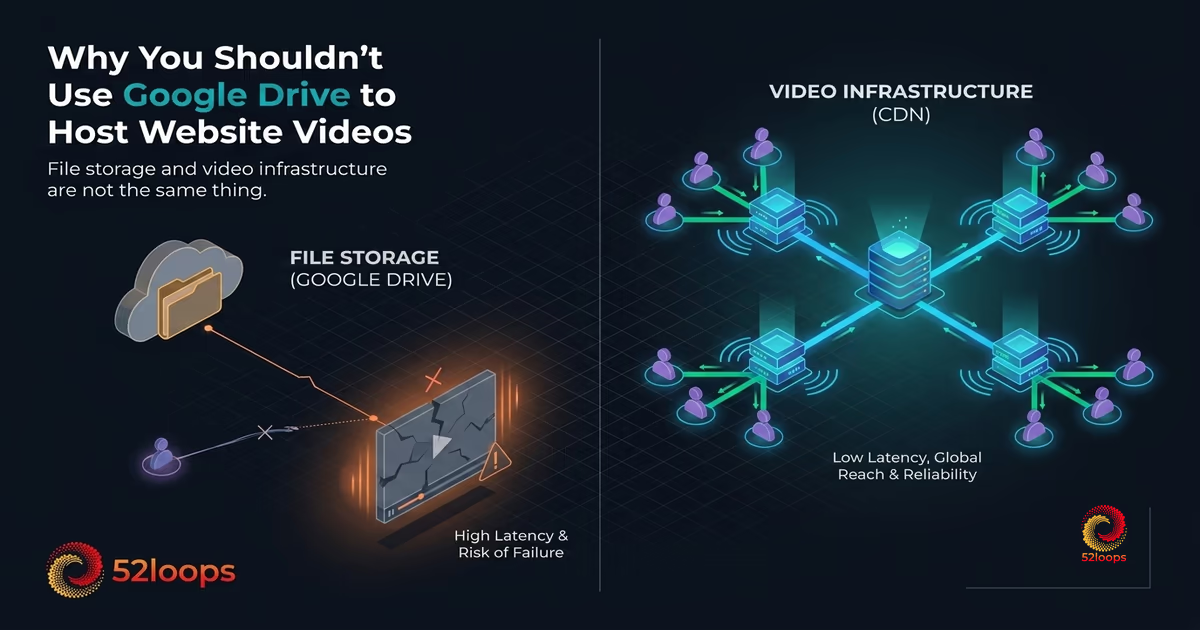
Neither path uses a video delivery network. Google Drive is file storage that happens to play video. Those are not the same thing.
A purpose-built video delivery system converts your upload into multiple resolution variants, packages them into HLS segments, and distributes those segments to edge servers worldwide. When a viewer presses play, the player fetches the nearest copy and adjusts quality in real time based on connection speed. Buffering is rare. Load times are fast regardless of geography.
Google Drive does none of this. It delivers a single file from a central origin. Research on adaptive bitrate streaming consistently shows that HLS with adaptive delivery cuts buffering significantly compared to progressive download, and that edge proximity is the single largest factor in initial load time. Google Drive provides neither.
The Six Reasons Google Drive Fails as Video Infrastructure
Reason 1: No HLS Streaming
HLS (HTTP Live Streaming) is the protocol modern video players use to deliver smooth, adaptive playback. It splits a video into short segments at multiple quality levels. The player continuously selects the appropriate quality based on the viewer's current bandwidth, switching between resolutions without interrupting playback.Google Drive does not use HLS. It serves the original file as a progressive download or buffered stream from a single source. A viewer on a mobile connection with fluctuating bandwidth gets buffering. A viewer on a slow connection waits seconds before the video begins. A viewer watching a large file finds playback stalls midway.
For a product demo, onboarding walkthrough, or paid course lesson, buffering is not an inconvenience. It is a conversion loss. Viewers abandon video within the first few seconds of buffering, and each additional second of startup delay costs you more of them. If your video takes five seconds to start on a mobile device because Google Drive is serving a raw file from a distant origin, you lose viewers before they see a single frame.
A purpose-built platform processes every upload into 320p, 720p, and 1080p variants. The player picks the right one and switches in real time. Smooth playback, higher engagement, no configuration required from your end.
Reason 2: No CDN Edge Delivery
A CDN (Content Delivery Network) is a global network of servers that cache your video close to the viewer. When a viewer in Sydney presses play on a video cached at a Sydney edge node, the data travels milliseconds. When the same viewer fetches a file from a US-based origin server, it travels 10,000 kilometers over the open internet, adding latency that shows up as buffering.
Google Drive does not operate as a CDN for video. Your files sit on Google’s infrastructure but are served from origin, not from edge nodes optimized for low-latency delivery. If your viewers are in the same country as Google’s serving region, performance might be acceptable. For an international audience, the degradation is measurable and immediate.
For a SaaS platform with users across time zones or an online course with students on multiple continents, origin-served video is infrastructure debt. Every viewer outside your delivery region gets a slower experience. This is architectural, not configurable. The only fix is a platform that distributes from edge nodes to begin with.
Reason 3: Google Can Disable Your Links Without Warning
This is the highest-risk issue, and the one most businesses discover the hard way.
Google Drive’s sharing system was designed for document collaboration. When Google’s automated systems flag a shared file for unusual access patterns, abuse signals, or policy concerns, sharing gets restricted or disabled automatically. No email. No dashboard warning. The link simply stops working.
Google’s own terms of service let them suspend or remove access to content at any time. Their abuse detection systems operate across billions of files and produce false positives at that scale. A product demo video shared in a high-traffic newsletter that gets thousands of views in a day can trigger automatic abuse detection, because that traffic pattern looks anomalous to Google’s systems.
Every video you host on Google Drive is one automated flag away from returning a “This file has been disabled” message to your visitors. If that video is on your pricing page, your onboarding module, or your sales deck, the damage is silent. You may not discover it for days. Your visitors see a broken embed. Your pipeline takes the hit.
There is no SLA on Google Drive share links. No support escalation path that guarantees restoration speed. Nothing to alert you when a link goes dark. You are building on infrastructure you do not control, with zero contractual reliability.
Reason 4: No Privacy Controls or Domain-Locking
When you share a video via Google Drive, sharing is binary. Either you restrict it to specific Google accounts, or you open it to “Anyone with the link.” There is no middle ground that lets the video play on your website but nowhere else.
This matters for paid content. If you are selling a course and hosting lessons on Google Drive, any student who knows the file URL can share it. The video will play for anyone who receives that link. There is no domain-locking, no referrer check, and no token-based access control.
For course creators protecting intellectual property or SaaS platforms hosting proprietary onboarding content, this is a structural vulnerability. You cannot protect your content from being shared or pirated using Google Drive. An unlisted URL is not protection. It is obscurity, and obscurity fails the moment one person shares a link.
Professional video infrastructure locks this down at the CDN layer. Set your domain, and the video will not load when the embed code is copied elsewhere. No configuration beyond that.
Reason 5: No Analytics
Google Drive provides no viewer analytics. You cannot see who watched a video, how long they watched, where they dropped off, or how many times a specific video was played. The file is served. You receive no data.
Without that data, you are making content decisions in the dark. Which leads watched your product demo, and for how long? At what point in your course do students most often abandon the material? Which onboarding video has the highest completion rate?
None of these questions can be answered using Google Drive. If a video is not performing, you will not know. If a video drives conversions, you cannot prove it. If a student never watches a critical module, you will not be alerted.
Analytics are not a luxury feature. They are the feedback loop that lets you improve your content, funnels, and product. Platforms that lock analytics behind higher tiers treat data as a revenue lever. Google Drive offers no tier that unlocks it at all.
Reason 6: GDPR and Data Processing Exposure
When you embed a Google Drive video on your website and a visitor from the European Union watches it, that viewer’s data is processed by Google. IP addresses, device information, and behavioral data flow through Google’s infrastructure under Google’s privacy terms.
Under GDPR, embedding third-party content that processes personal data requires user consent or a legal basis for processing. Google Drive was not built as a GDPR-compliant video delivery tool. There is no data processing agreement for Drive embeds on external websites. No consent mechanism in the player. No public documentation on what Google collects from anonymous website viewers.
GDPR Articles 5 and 6 require a lawful basis for processing personal data. Using Google Drive embeds creates a data processing chain that runs through Google’s systems without the documentation or consent flow a serious compliance posture requires. Fines under GDPR can reach 4% of annual global turnover or 20 million euros, whichever is higher. The European Data Protection Board has issued specific guidance that makes clear the controller (you) bears responsibility for data processed by embedded services. For a business with EU customers, that is a gap worth closing before a regulator finds it.
What Professional Video Infrastructure Actually Provides
The gap between Google Drive and dedicated video infrastructure is not a feature list. It is architectural.
When you upload a video to a purpose-built platform, that video is transcoded into multiple resolutions and packaged into HLS segments. Those segments are distributed to a global CDN edge network. When a viewer presses play, the nearest edge node serves the video. The player monitors connection quality and adjusts resolution automatically. Playback is smooth on fiber and on mobile.
Privacy controls operate at the CDN layer. Domain-locking means your video plays on your website and nowhere else. Your embed code cannot be reused. A student who shares a Google Drive link with a friend gets a working video. A student who shares your 52loops embed link gets a blocked player.
Analytics capture every view. You can see completion rates, drop-off points, and viewer engagement. If a specific onboarding video has a 30% completion rate and the others average 80%, you know which one to fix.
The cost model is predictable. Think of it like a mobile data plan: instead of paying per gigabyte after the fact, you reserve a fixed block of capacity upfront. A flat-rate Highway Unit covers 1 TB of bandwidth and 100 GB of storage. You know your costs before the billing cycle opens. There is no Invoice Anxiety , no surprise charges when a video goes viral, and no usage-based metering that turns growth into a penalty.
That is the standard growing businesses should hold their video infrastructure to: it plays reliably, it protects your content by default, and the billing is settled before the month begins.
The Real Cost of Using Google Drive for Video
Google Drive is free. That is the appeal. But the cost of using it for video hosting shows up in ways that never hit an invoice.
It shows up in buffering for international visitors who leave before your content loads. It shows up in conversion loss from a pricing page video that silently stopped working because Google flagged your file. It shows up in course students sharing your Drive links freely because nothing stops them. It shows up in compliance exposure from uncontrolled data processing on EU visitor sessions.
None of these costs appear in a bill. They appear in metrics that look like product problems but are actually infrastructure problems.
The same pattern that signals you have outgrown YouTube applies to Google Drive too: when your video infrastructure starts working against your business goals, the platform is the problem. Google Drive was not designed to be part of your production stack. Using it as one is a decision made out of convenience that compounds into risk over time.
Switching is not complicated. Upload your videos to a dedicated platform, replace the Drive embed code with the new player embed. Your videos play faster, stay private, and stay live. Costs are known before the billing cycle starts. Analytics work from day one.
Video infrastructure should be the most boring part of your stack: predictable, invisible, reliable. Google Drive is interesting in exactly the wrong ways.
Frequently Asked Questions
A Highway Unit is the fundamental building block of your 52loops account. Instead of forcing you into restrictive tiers, we provide you with a fixed bucket of resources.
Every single feature, including our high-performance Player, Global CDN, ad-free hosting, and referer protection—is included in every Highway Unit.
Each unit provides a base of: - 1TB Bandwidth (Upgraded to 2TB for Founding members ) - 100GB Storage - 100 Video Slots
As your business grows, you simply add more units to increase these limits. See How Stacking Units works .
Invoice Anxiety is the psychological burden felt by business owners when using usage-based billing models. It occurs when success—like a viral video or a successful product launch—leads to unpredictable and often massive overage charges.
Instead of celebrating a win, you're stuck doing damage control on your bank account. We built 52loops specifically to eliminate this anxiety by using Reserved Capacity instead of metered billing.
Egress is simply the movement of data from a server to your viewer. Most platforms use outdated architectures that incur high costs from their own providers, and they pass that markup (often 500% or more) on to you.
By building on a modern, zero-egress backbone and partnering with providers in the Cloudflare Bandwidth Alliance, we eliminate the middleman markup. You pay for the actual delivery, not the legacy company's overhead.
HLS (HTTP Live Streaming) is the delivery standard 52loops uses for all video playback. Instead of sending a single fixed-quality video file, the platform encodes your upload into multiple quality levels (320p, 720p, 1080p) and breaks each into short segments.
The player monitors your viewer's available bandwidth in real time and selects the appropriate quality level automatically. On a fast connection, your viewer gets 1080p. On a mobile connection mid-commute, the player steps down to 720p or 320p to keep playback smooth without buffering.
The practical result is that your video starts faster and stalls less often, regardless of the viewer's network conditions. HLS is the same delivery method used by Netflix and YouTube, and it is supported natively on every modern device and browser.
A CDN (Content Delivery Network) is delivery infrastructure. It moves files from servers to viewers quickly, using a global network of edge nodes. Bunny.net, Cloudflare, and AWS CloudFront are CDNs.
A video platform is a complete product built on top of delivery infrastructure. It includes the player, transcoding pipeline, domain-locking, analytics, and support, assembled and maintained so you do not have to.
52loops is a video platform. It uses a CDN (Cloudflare's global edge network) as part of its infrastructure, but the CDN is one component among several, not the product itself.
The distinction matters for cost estimation. A CDN price covers delivery only. A video platform price covers delivery plus everything required to make delivery work reliably for non-technical operators.
I use a "Referer check" - a digital bouncer for your content. When you embed a Loop, the platform checks exactly where that request is coming from. If someone tries to post your video link on a public forum, the circuit breaks and the video won't play. It's a high bar that stops the vast majority of "hotlinking" that would otherwise drain your bandwidth.