
Video infrastructure should be the most stable part of your stack. For course creators, video isn’t just a marketing tool. It is the core product in a global eLearning market projected to reach $325 billion by 2025. If your videos buffer, your product is broken. If your video hosting bill spikes unpredictably, your profit margins vanish overnight. And if your platform goes down on launch day, the cost of that single outage exceeds a full year of hosting fees.
The 2026 landscape has polarized into three distinct categories. First, legacy platforms push complex “Fair Use” tiers that punish success. Second, developer-focused CDNs require an engineering team to implement. Third, there’s a growing category of infrastructure-first platforms built specifically for course creators who recognize the signs they have outgrown traditional hosting and just want reliable delivery without the headaches.
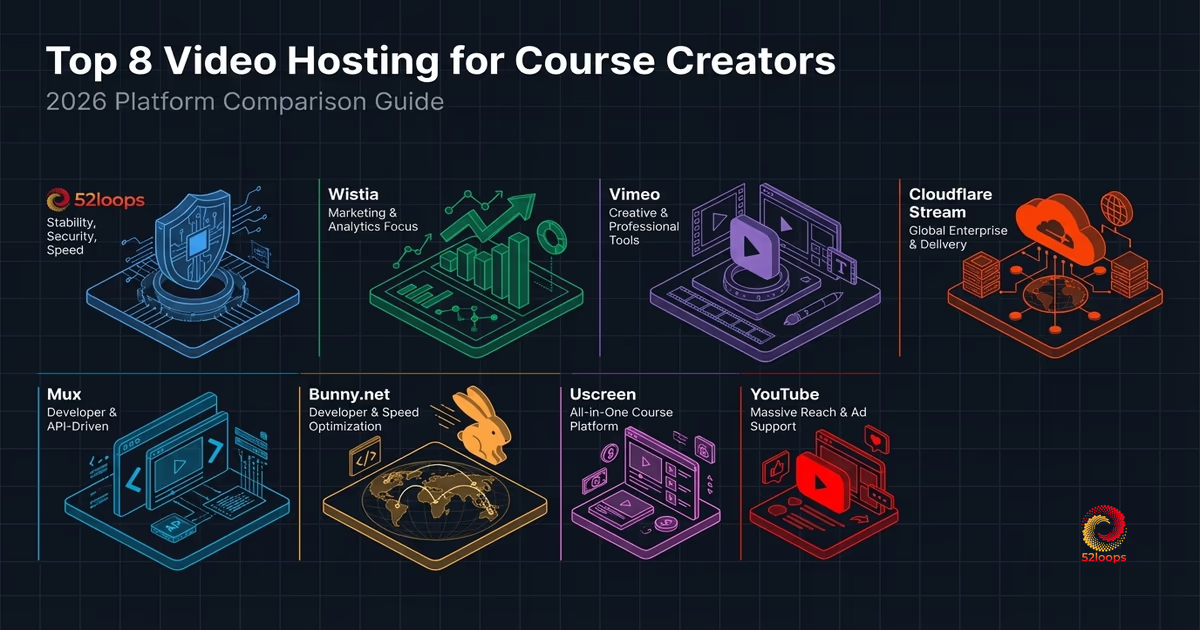
Here’s a breakdown of the top 8 video hosting platforms for course creators, evaluated through the lens of operational stability and pricing predictability. For individual educators and those operating at a smaller scale, our affordable video hosting guide for solopreneurs offers a more targeted framework for managing entry-level costs without sacrificing long-term stability.
The Infrastructure Decision
Most course creators choose a video platform based on player features: the embed code, the customization options, the analytics dashboard. That’s a mistake. The billing model is what actually matters: it determines whether your costs stay predictable or spiral when your course goes viral.
Before you sign up for any platform, ask these five questions:
How is bandwidth charged? Is it unlimited, metered, or reserved capacity? Unlimited sounds great until you hit the threshold and get hit with overage fees.
What happens when I scale? Will my costs scale linearly (predictable) or exponentially (dangerous)?
Are there video limits? Some platforms charge per video after a certain count. For a 200-lesson course, that adds up fast.
What’s the growth penalty? Does the platform reward your success with higher prices (the Success Tax ) or protect it?
Can I export my content? Some platforms make it incredibly difficult to leave. If your course is your livelihood, you need portability.
The answers to these questions will determine whether you build a sustainable business or constantly live with Invoice Anxiety .
1. 52loops: The Predictable Anchor
52loops was built specifically to eliminate the Success Tax. It works like a professional mobile data plan: you buy reserved capacity in advance, not usage after the fact.
The core unit is the Highway Unit : 2TB of bandwidth (early adopter rate) and 100GB of storage bundled together at a fixed $20 per unit. This follows the mobile data plan analogy for video infrastructure: you buy reserved capacity in advance, ensuring linear scaling at its finest. If you need more capacity, you add another unit. No surprises, no overage bills, no math required.
What makes 52loops different is the Growth Buffer : a 20% cushion that absorbs traffic spikes at no extra cost. If you have a viral launch, the platform covers the excess traffic mid-month. You only adjust your plan at the start of the next billing cycle, not after the spike hits your bank account.
The platform also includes edge-level referrer protection, which prevents your course videos from being embedded on unauthorized sites. For course creators who need a layered approach, 3 Ways to Protect Your Course Videos from Being Pirated covers how domain locking, signed URLs, and watermarking work together.
Pros:
- 100% predictable pricing with linear scaling
- Growth Buffer absorbs viral spikes
- Edge-level referrer protection prevents piracy
- No per-video charges regardless of library size
- Fast-loading video player with no blocking
- Excellent Core Web Vitals scores
- Built-in CTA support for conversions
- Good analytics with engagement tracking
- Zero cookie tracking (privacy-compliant)
Cons:
- No A/B testing yet
- Pure infrastructure: it’s built for delivery, not discovery
- Limited third-party integrations compared to marketing platforms
- No free tier (7-day money-back guarantee instead)
Best For: Course creators who want rock-solid reliability and zero “Invoice Anxiety”. If you’re building a sustainable, scale-aware business and care more about predictable costs than marketing features, this is your platform.
Pricing: $20 per Highway Unit (2TB bandwidth + 100GB storage, early adopter rate). No per-video fees.
2. Wistia: The Marketing Heavyweight
Wistia has long been the gold standard for marketing-focused video hosting. Their players are beautiful, and their analytics integrations run deeper than any competitor. If you need to track how viewers engage with your content: their heatmaps, engagement graphs, and conversion tracking, Wistia delivers.
The platform shines for marketers who treat video as a lead generation tool. Their “Turnstile” feature lets you collect email addresses directly in the video player. You can add custom CTAs at any point. Integration with HubSpot, Salesforce, and Marketo works out of the box.
But here’s where it gets expensive. Wistia charges per video after you exceed your plan’s limit. For a course library with 200+ lessons, the per-video fees add up fast. Their bandwidth limits can also trigger expensive plan upgrades, often mid-billing-cycle.
Pros:
- Exceptional marketing tools and CRM integrations
- Built-in email capture (Turnstile)
- Detailed analytics and viewer engagement data
- Beautiful, customizable player
- A/B testing for video thumbnails and CTAs
Cons:
- Per-video charges can become expensive for large libraries
- Bandwidth overages trigger expensive plan upgrades
- Not designed for high-volume course delivery
- Pricing not transparent at scale
Best For: High-ticket B2B courses where lead generation matters more than volume. If your course is a marketing asset that feeds a higher-ticket sales funnel, Wistia’s tracking capabilities are invaluable.
Pricing: Starts at $99/month for 10 videos. Scales up quickly with add-on videos and bandwidth.
3. Vimeo: The Creative Standard
Vimeo is the default choice for many creators: it offers a massive network, high-quality playback, and a familiar interface. It’s the platform most people’s clients have heard of, which gives it credibility.
The collaboration tools are genuinely excellent. If you have a video editing team, Vimeo’s review features, timestamped comments, and version control make production workflows much smoother. For filmmakers and content teams, this is a significant advantage.
But for course creators, Vimeo’s “Fair Use” policy is a trap. When your course takes off (which is the goal), Vimeo can push you into a costly Enterprise plan with no warning. Pricing isn’t transparent at scale: you won’t know your actual costs until you’re already over the limit. The “unlimited” branding masks the reality that success triggers price spikes.
Pros:
- Familiar interface with broad recognition
- Excellent collaboration tools for video production teams
- High-quality playback and adaptive streaming
- Strong brand recognition with clients
Cons:
- “Fair Use” policy punishes success
- Enterprise pricing is opaque and expensive
- Not designed specifically for course delivery
- Limited marketing integrations compared to Wistia
Best For: Filmmakers and creators who need portfolio hosting, not course delivery. If your primary use case is showcasing work to clients, Vimeo’s strengths apply.
Pricing: Free for basic use. Paid plans start at $12/month. Enterprise pricing requires sales contact: expect $200+/month at scale.
4. Cloudflare Stream: The Enterprise CDN
Cloudflare Stream is the enterprise version of the CDN approach. If you need global distribution at scale, Cloudflare’s infrastructure is nearly unmatched. Their network spans 300+ cities across 100+ countries. Your videos will load fast anywhere in the world.
The pricing model is usage-based: you pay for encoding minutes and delivery bandwidth. It’s competitive with raw CDN pricing but comes with Cloudflare’s reliability and security infrastructure. They handle encoding, storage, and delivery in one package.
The downside is similar to Bunny.net: this is infrastructure, not a course platform. You’ll need to build the user-facing experience yourself: the video player, the course navigation, the progress tracking. Cloudflare provides the pipes, not the house.
Pros:
- Enterprise-grade global CDN infrastructure
- Competitive usage-based pricing
- Excellent reliability and security
- Integrated encoding and delivery
Cons:
- Requires significant development work to build a course experience
- No built-in analytics or marketing tools
- Usage-based billing can become unpredictable at scale
- No native course delivery features
Best For: Organizations with engineering teams who need global scale. If you have developers building a custom platform and need the best possible CDN, Cloudflare Stream delivers.
Pricing: $1 per 1,000 encoding minutes, $0.10 per GB of delivery. Can scale unpredictably. A detailed cost breakdown against fixed-capacity billing is available in 52loops vs. Cloudflare Stream: Fixed Price vs. Pay-Per-Minute.
5. Mux: The Developer Video Platform
Mux is the video infrastructure for developers who want best-in-class streaming quality. Built by the team that created the video player library used by Vimeo and YouTube, Mux brings serious streaming expertise to the table.
Their product is two-fold: Mux Video (the streaming infrastructure) and Mux Data (the analytics). The quality is exceptional: adaptive bitrate streaming works flawlessly, and their encoding pipeline produces optimal results for every device.
However, Mux is explicitly developer-focused. There’s no dashboard for managing video metadata, no simple admin interface, and no course-specific features. You’re building the entire experience: uploads, player customization, progress tracking, access control. If you have a strong engineering team, this is a premium alternative to Bunny.net. If you don’t, look elsewhere.
Pros:
- Best-in-class streaming quality
- Sophisticated analytics built in
- Developer-friendly API and documentation
- Competitive pricing for usage-based model
Cons:
- No admin dashboard: you’re building everything
- No course-specific features
- Requires dedicated engineering resources
- Usage-based pricing can spike unexpectedly
Best For: Engineering teams building custom video platforms. If you’re a technical founder building a video-first product, Mux provides the infrastructure foundation.
For a detailed breakdown of how Mux’s developer API model compares to a complete platform, 52loops vs. Mux covers the billing math, assembly cost, and the difference between a video API and a video hosting platform.
Pricing: $4 per 1,000 video encoding minutes, $0.50 per GB delivery. Usage-based, can scale unpredictably.
6. Bunny.net: The Developer CDN
Bunny.net is a raw CDN that offers a stream product. The pricing is low, but you have to build the integration yourself. The pricing is notably lower than Cloudflare or Mux, making it attractive for cost-sensitive technical projects.
The platform offers solid performance and global edge coverage. Their stream product includes a basic player, encoding, and delivery. It’s functional, if bare-bones.
But you have to build everything. There’s no dashboard for managing video metadata, no simple player embed (beyond the basics), and configuring security rules requires development experience. You’re not just buying hosting: you’re building a platform.
Pros:
- Highly competitive pricing
- Good global performance
- Simple stream product that works
- Pay-as-you-go flexibility
Cons:
- Requires significant development work
- No admin dashboard for non-technical management
- Security configuration needs engineering support
- You’re building the course experience from scratch
Best For: Highly technical course creators with custom-built platforms and a developer on the team. If you have the engineering capacity and need the lowest possible infrastructure cost, Bunny.net delivers. For a detailed breakdown of what that tradeoff looks like against a complete platform, see 52loops vs. Bunny.net.
Pricing: ~$0.01 per GB of bandwidth, $5 per GB of storage. Extremely competitive but requires development investment.
7. Uscreen: The Course Platform
Uscreen occupies a different category entirely: it’s a course platform first, video hosting second. If you want an all-in-one solution for building, marketing, and selling video courses, Uscreen handles the entire stack.
The platform includes course landing pages, payment processing, email marketing integrations, and community features. It’s designed for creators who want to launch quickly without hiring developers. You upload videos, set up your course structure, and start selling.
The trade-off is flexibility and cost efficiency at scale. Uscreen’s video hosting is included but not necessarily competitive with dedicated infrastructure. As your course library grows, you may find yourself paying more for hosting than you would with a dedicated infrastructure provider. The platform also takes a transaction fee on sales, which adds up.
Pros:
- All-in-one course platform
- No development required
- Built-in payment processing and marketing tools
- Quick launch timeline
Cons:
- Video infrastructure is secondary to course features
- Transaction fees reduce margins
- Less control over video delivery
- Can become expensive at scale
Best For: New course creators who want to launch quickly without technical complexity. If you’re just starting and need the fastest path to market, Uscreen removes friction.
Pricing: Starts at $95/month. Transaction fees on sales. Video storage and bandwidth included but not unlimited.
8. YouTube: The Top-of-Funnel Engine
YouTube is unparalleled for discovery. With 2.5 billion monthly users and the world’s second-largest search engine, no platform comes close to YouTube’s organic reach. If you want people to find your content, YouTube is the answer.
But hosting your paid course there? That’s a mistake. Here’s why:
First, ads from competitors run alongside your content. Your students see advertisements from your competitors while trying to learn. That’s not an experience you can control.
Second, recommendation algorithms send students down rabbit holes. Instead of progressing through your course, they’re recommended other videos that lead them away from your content. Your course becomes a gateway to someone else’s channel.
Third, zero privacy control. Anyone with an unlisted link can share it anywhere. Your course is one screenshot away from being pirated. There’s no referrer protection, no domain locking, no way to control where your content appears.
Pros:
- Free. Infinite bandwidth.
- Massive search engine visibility
- Best-in-class video player experience
- No infrastructure maintenance
Cons:
- Ads from competitors running alongside your content
- Recommendation algorithms distract students
- Zero privacy control
- Easy to pirate
- No course delivery features
- Can monetize your content without your permission
Best For: Free marketing videos and top-of-funnel content. If you use YouTube to attract students and drive them to a paid platform, it works brilliantly. Never for the paid course itself.
Pricing: Free for storage and delivery.
How to Choose the Right Platform
After evaluating eight platforms across three categories, the choice comes down to your priorities. Here’s the framework:
Choose 52loops if: You want predictable, linear pricing. You care about operational stability over marketing features. You’re building a sustainable course business and want to eliminate invoice anxiety.
Choose Wistia if: Video is a marketing tool that feeds a high-ticket sales funnel. You need lead generation features and detailed analytics. Your course library is under 100 videos.
Choose Vimeo if: You need collaboration tools for a video production team. Your clients expect to see work on Vimeo. You’re not primarily a course creator.
Choose Cloudflare Stream or Mux if: You have a dedicated engineering team. You’re building a custom platform and need the best infrastructure. Global scale is non-negotiable.
Choose Bunny.net if: You have engineering capacity and need the lowest possible cost. You’re building something custom and are price-sensitive. Compare the full billing model in 52loops vs. Bunny.net.
Choose Uscreen if: You want to launch fast without technical complexity. You need an all-in-one solution. You don’t have developers on the team.
Choose YouTube for: Free marketing content only. Never for paid courses.
The 2026 landscape has something for everyone. The key is matching your infrastructure choice to your business model: not the other way around.
Frequently Asked Questions
A Highway Unit is the fundamental building block of your 52loops account. Instead of forcing you into restrictive tiers, we provide you with a fixed bucket of resources.
Every single feature, including our high-performance Player, Global CDN, ad-free hosting, and referer protection—is included in every Highway Unit.
Each unit provides a base of: - 1TB Bandwidth (Upgraded to 2TB for Founding members ) - 100GB Storage - 100 Video Slots
As your business grows, you simply add more units to increase these limits. See How Stacking Units works .
Instead of complex "Pro" or "Enterprise" tiers where you pay for features you don't need, 52loops scales linearly. Each Highway Unit you add gives you exactly the same predictable capacity.
Example: - 1 Unit: 1TB Bandwidth, 100GB Storage, 100 Videos ($20/mo) - 2 Units: 2TB Bandwidth, 200GB Storage, 200 Videos ($40/mo) - 5 Units: 5TB Bandwidth, 500GB Storage, 500 Videos ($100/mo)
You have the same total freedom and features regardless of whether you have 1 unit or 100.
It's the penalty legacy platforms charge you for doing exactly what you set out to do—succeed.
When your video goes viral or your message reaches a massive audience, traditional hosts see that traffic as a "liability" or a cost to be recovered. They trigger automated overage fees or force you onto enterprise plans mid-month, effectively taxing your growth. At 52loops, we view that same traffic as a signal to be amplified, not a billable event.
The "Success Tax " is one of the things I hate most about legacy platforms. If a video goes viral, you shouldn't get a terrifying bill.
At 52loops, if you genuinely cross your unit limits mid-month, the system automatically adds an additional "Highway Unit " to your account to keep things stable. I cover the cost of that upgrade for the rest of your current billing cycle.
Example: Imagine you have 1 Highway Unit (1TB Bandwidth). On the 15th of the month, a video goes viral and you hit 2.5TB. 1. We automatically add a 3rd Unit (increasing your limit to 3TB). 2. Your videos keep playing without interruption. 3. You pay $0 extra for that 3rd unit for the remainder of the month. 4. At the start of the next cycle, you can choose to keep the 3rd unit if your growth is permanent, or drop back to 1 unit if it was just a temporary spike.
Invoice Anxiety is the psychological burden felt by business owners when using usage-based billing models. It occurs when success—like a viral video or a successful product launch—leads to unpredictable and often massive overage charges.
Instead of celebrating a win, you're stuck doing damage control on your bank account. We built 52loops specifically to eliminate this anxiety by using Reserved Capacity instead of metered billing.