
Most solopreneurs pick a video host by comparing the monthly subscription price. That is the wrong number.
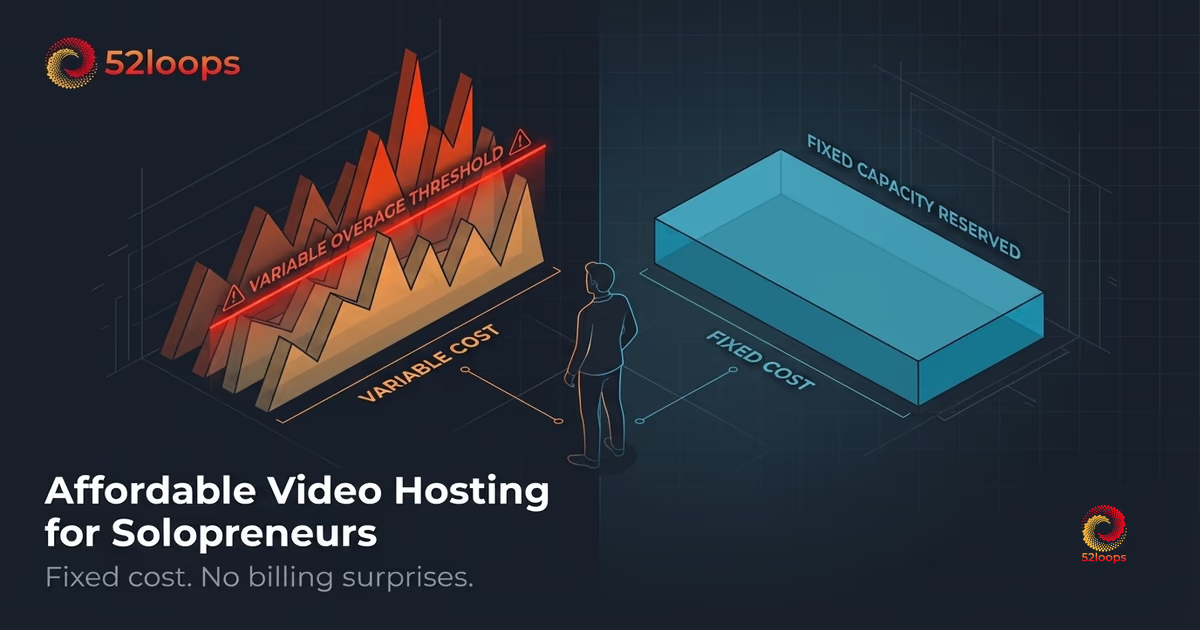
The number that matters is the ceiling: the maximum you will ever pay in a given month. Most video hosting plans do not have one. They have a base price and a billing meter that runs quietly in the background. When your course launch goes better than expected, that meter accelerates. The bill arrives weeks later, well after the celebration has passed.
Affordable video hosting is not about finding the cheapest monthly plan. It is about finding a plan whose cost cannot surprise you. This guide explains the difference, walks through the six most practical options for solo operators in 2026 (including YouTube, where most solopreneurs start), and gives you a formula to calculate what your video delivery actually costs before you commit. If you are currently using Google Drive to host your videos, the reasons it fails as video infrastructure go beyond cost into reliability and privacy.
Why “affordable” and “fixed cost” are not the same thing
The video hosting industry is built on a cost model inherited from cloud storage providers: you pay per gigabyte of data delivered. This is called egress . When a student watches your course, their device pulls video data from a server. That data transfer costs the platform money, and most platforms pass it to you through bandwidth tiers or overage fees.
On Amazon CloudFront, egress to the internet runs between $0.085 and $0.120 per GB depending on region and volume. Platforms built on top of this infrastructure absorb that cost, which is why “unlimited” plans often come with fair use clauses that quietly cap delivery at a hidden threshold. Exceed it, and the Success Tax kicks in.
Here is what this looks like in practice. A one-hour HD course at 1080p, encoded at a typical 2.5 Mbps bitrate, weighs roughly 1.1 GB. If 200 students each watch it twice a month, you have delivered 440 GB that month. At $0.10 per GB in passthrough costs, that is $44 in bandwidth alone, on top of your base subscription.
Now imagine your course gets featured in a newsletter. Views spike to 1,000 in a week. The bandwidth bill doubles before you have had time to update your pricing page. You did not change anything about the product. You just got more students.
That is not a usage problem. It is an architecture problem. And the distinction matters when you are choosing a platform.
What solopreneurs actually need from video hosting
Before comparing platforms, it helps to be precise about what a solo operator actually requires. The list is shorter than most platform feature pages suggest.
Reliable delivery. Your videos need to load consistently across devices and connection speeds, without buffering or playback failures. Most modern platforms meet this baseline. The question is whether they charge you proportionally when delivery succeeds.
Embed flexibility. You need to embed videos in your course platform, whether Kajabi, Teachable, Thinkific, Circle, or a custom WordPress build. Any platform that restricts embeds to its own environment is a course platform, not a video host. For paid communities specifically, our guide to the best video host for Circle.so communities covers the decision in detail.
A branded player. Your videos should not carry another platform’s logo or recommend competitor content after playback ends. If your course is your product, your player should look like your product.
Predictable pricing. You cannot afford to monitor a bandwidth dashboard every time you run a promotion. Your hosting bill should be a settled line item in your monthly budget, not a variable that demands active management.
Reasonable storage. Most solopreneur course libraries contain between 5 and 50 hours of video content. Storage requirements are modest, generally under 100 GB even for prolific creators.
Notice what is not on the list: advanced analytics suites, per-seat licensing, API access for custom workflows, or multi-user team dashboards. These are enterprise requirements. As the eLearning market reaches an estimated $370 billion in 2026, the number of platforms claiming to be “all-in-one” has exploded. When a platform bundles these features into the price you pay, you are subsidizing infrastructure you will never touch.
The 6 best video hosting options for solopreneurs in 2026
1. 52loops: Fixed capacity, zero-egress architecture
52loops uses a reserved-capacity model built around Highway Units . Each plan purchases a dedicated slice of infrastructure: 1 TB of bandwidth and 100 GB of storage per unit. That capacity belongs to you for the billing cycle. There is no per-GB meter running in the background.
The zero-egress model is structural, not a pricing policy. It relies on a class of storage providers, including Cloudflare R2, Backblaze B2, and Wasabi, that have joined the Bandwidth Alliance and agreed to waive egress fees between their networks and Cloudflare’s CDN. Call them “zero-egress storage providers.” Because data transfer between these providers and Cloudflare’s CDN occurs within the same peered network, there is no outbound bandwidth cost to incur. A platform built on this architecture has no variable delivery cost to pass through, which is why it can offer genuinely fixed pricing.
For solopreneurs, the plan price is the plan price, regardless of whether a launch drives 50 views or 5,000. That is what makes it affordable in the way that actually matters.
There is also a second layer of protection worth knowing: the Growth Buffer . If your delivery spikes beyond your plan’s included bandwidth in a given cycle, 52loops covers the excess at no charge and adjusts your capacity at the next billing cycle. No retroactive overage invoice. No account lock. You find out about real growth at renewal, not as a surprise line item mid-month. That is how we eliminate the Invoice Anxiety that usually follows a successful promotion.
Cost model: Fixed monthly capacity Ease of setup: No-code, embed-ready Overage risk: None (structural) Best for: Course creators who need predictable infrastructure without engineering overhead
2. Bunny.net: Low floor, variable ceiling
Bunny.net is a CDN with video hosting capabilities. Storage costs around $0.01 per GB per month, and bandwidth delivery runs between $0.005 and $0.06 per GB depending on region. At very low view volumes, the numbers look appealing.
The catch is that both costs scale with usage. A quiet month produces a low bill. A successful launch produces a proportionally larger one. Bunny.net can be genuinely affordable for solopreneurs with stable, predictable view counts. As an audience grows, the cost becomes less predictable. For a detailed billing comparison including a spike scenario, see the 52loops vs. Bunny.net breakdown.
Setup also requires more technical comfort than a managed platform. You configure storage zones, pull zones, and CDN routing manually. It is not difficult for someone technically inclined, but it is not a no-code experience.
Cost model: Pay-per-GB (storage and bandwidth) Ease of setup: Moderate (requires technical configuration) Overage risk: Low at low volume, scales with viewership Best for: Technical solopreneurs with stable, low view counts
3. Vimeo Starter: Clean player, bandwidth cap
Vimeo’s Starter tier has improved significantly. It now includes 2 TB of storage and 2 TB of monthly bandwidth, along with a clean player, solid embed support, and no advertising. For most solopreneurs, 2 TB of storage covers years of content at 1080p.
The bandwidth cap is where it gets tighter. At 2 TB per month, a library of 10 hours of 1080p content can serve roughly 1,800 full views before hitting the ceiling. That is generous for steady-state operations but can become a constraint during a launch spike or a high-traffic month. Exceeding the cap requires upgrading to a higher tier, which introduces per-seat pricing designed for teams rather than solo operators. Sales-oriented platforms take this further: Vidyard alternatives for small teams documents how seat-based pricing compounds when a platform is built for revenue intelligence rather than content delivery.
Vimeo suits solopreneurs who want a polished, no-code experience and have predictable, moderate view volumes. The bandwidth cap rather than storage is now the variable to watch. For a full pricing comparison including how fair use policies have historically worked, see the 52loops vs. Vimeo breakdown.
Cost model: Tiered subscription with bandwidth cap Ease of setup: Simple, no-code Overage risk: Bandwidth cap, not storage; upgrade costs jump significantly Best for: Creators with moderate, predictable viewership who want a polished player
4. Cloudflare Stream: Pay-per-minute, developer-first
Cloudflare Stream charges $5 per 1,000 minutes of video stored and $1 per 1,000 minutes delivered. At low volume, the cost is minimal. At medium volume, it becomes comparable to fixed-price alternatives, without the predictability.
More importantly, Cloudflare Stream is a developer product. There is no visual dashboard for course creators, no built-in embed generator, and no course-oriented workflow. Using it effectively requires API integration or a third-party layer built on top of the Stream API.
For solopreneurs without engineering resources, the operational overhead outweighs any cost advantage. For those comfortable with APIs who want to build custom video workflows, it is capable infrastructure. The billing math at different library sizes is worked through in 52loops vs. Cloudflare Stream: Fixed Price vs. Pay-Per-Minute.
Cost model: Pay-per-minute stored and delivered Ease of setup: Complex (developer API required) Overage risk: Scales linearly with view volume Best for: Technical solopreneurs building custom video pipelines
5. Self-hosting on S3 and a CDN: Lowest floor, highest overhead
Hosting video yourself on Amazon S3 with CloudFront delivery offers the lowest per-unit cost at sufficient scale. S3 storage runs $0.023 per GB per month. CloudFront delivery runs $0.0085 to $0.085 per GB depending on region.
For a solopreneur with 50 GB of content and low viewership, the monthly infrastructure bill might total $5 to $15. That is genuinely cheap.
What it costs is time. You manage storage configuration, CDN settings, encoding pipelines, player integration, and security permissions manually. You are not buying a video hosting service. You are building one. Every hour spent on infrastructure maintenance is an hour not spent on your course, your students, or growing your business.
Self-hosting makes economic sense at high volume, where per-unit savings compound. For most solopreneurs, the operational overhead exceeds the cost of a managed platform by a wide margin.
Cost model: True pay-per-use (storage and CDN delivery) Ease of setup: High complexity (infrastructure engineering required) Overage risk: Variable, but you control the architecture Best for: Technical solopreneurs at high volume who want maximum cost control
6. YouTube: Free to host, costly to own
YouTube is where most solopreneurs start, and for good reason. It is free, the upload and encoding pipeline is handled for you, and global delivery is reliable. For top-of-funnel content, it remains hard to beat.
The problem is ownership. YouTube controls the player, the recommendations after playback, the monetization terms, and ultimately whether your videos stay up. For a public marketing video, those tradeoffs are acceptable. For a paid course or gated product, they are not.
Your course videos will have competitor ads shown before them unless you pay to remove them. YouTube can recommend other creators’ content directly after your lesson ends. And if your account is flagged or suspended for any reason, your entire library goes offline with no notice and no appeal timeline.
The cost model is also deceptively expensive at scale. YouTube is free to host, but it is not free to use as a business tool. The price is control: over the viewing experience, over the data, and over the relationship with your students. For solopreneurs building a paid product, that is a high price. For solopreneurs who are ready to move their course videos off YouTube, a dedicated host removes these constraints entirely.
Cost model: Free (ad-supported) Ease of setup: Simple Overage risk: None (but platform risk is high) Best for: Top-of-funnel public content only, not paid or gated course delivery
Quick comparison
| Platform | Cost model | Overage risk | Setup complexity | Best for |
|---|---|---|---|---|
| 52loops | Fixed capacity | None | Simple | Predictable growth |
| Bunny.net | Pay-per-GB | Low to medium | Moderate | Technical, low-volume |
| Vimeo Starter | Tiered subscription | Bandwidth cap (2 TB/mo) | Simple | Moderate, predictable viewership |
| Cloudflare Stream | Pay-per-minute | Scales with views | Complex | Developer workflows |
| Self-hosted S3 | True pay-per-use | Variable | High | High volume, technical |
| YouTube | Free (ad-supported) | Platform risk | Simple | Top-of-funnel public content |
How to calculate your real monthly video cost
Before choosing a platform, run this calculation against any plan you are considering.
Step 1: Estimate your monthly delivery volume in gigabytes.
Take the total hours of video in your library. Multiply by the average number of views per video per month. Multiply by the file size per hour of video at your target quality.
At 1080p encoded at 2.5 Mbps, one hour of video weighs approximately 1.1 GB. At 720p encoded at 1.5 Mbps, it weighs approximately 0.67 GB.
Formula: (hours of video) x (avg monthly views per video) x (GB per hour) = monthly GB delivered
Example: 10 hours of 1080p course content, 50 monthly views per video: 10 x 50 x 1.1 = 550 GB/month
Step 2: Apply the platform’s cost model.
For per-GB platforms (Bunny.net, self-hosted S3): multiply your monthly GB by the delivery rate to get your bill.
For fixed-capacity platforms (52loops): compare your monthly GB against the plan’s included bandwidth. If 550 GB fits within 1 TB, your cost is the plan price, regardless of actual delivery.
For tiered platforms (Vimeo): check whether your total storage fits within the tier’s allotment before delivery costs become a problem.
Step 3: Model a launch scenario.
Assume a successful promotion triples your monthly views. Apply the same calculation. On a per-GB platform, the cost triples. On a fixed-capacity platform, the cost stays the same.
That difference is the practical meaning of affordability for a growing business.
The infrastructure question you should ask before choosing
Every video hosting platform will tell you its monthly price. Very few will tell you its ceiling.
Before committing to any platform, ask one question: “Is your egress cost fixed or variable?”
If the answer involves phrases like “fair use,” “reasonable use,” “overage protection,” or “burst allowance,” the cost is variable. Those are policies, not architecture. Policies change when it is commercially convenient to change them. Architecture is harder to walk back.
The only structural way to eliminate overage risk is to use a platform built on zero-egress storage providers, the class of storage networks (Cloudflare R2, Backblaze B2, Wasabi, and others) that have waived egress fees within the Bandwidth Alliance. The architecture of stability section explains how this peered-network model removes the outbound cost entirely. The deep dive on zero-egress architecture explains why this is an infrastructure decision, not a billing decision.
A platform built on that architecture has no variable cost to pass through. That is a structural guarantee, not a promotional promise.
For solopreneurs, this distinction matters most at growth moments. The times when your course performs well are exactly the times a metered platform bills you most aggressively. A fixed-capacity model works in the opposite direction. Your infrastructure cost stays constant whether you have 10 students or 1,000.
For a detailed breakdown of how per-GB billing works in practice, see the 2026 guide to video hosting overages. For a side-by-side comparison across eight platforms, the top video hosting platforms for course creators covers each in detail.
The short version: if you cannot name the ceiling on your monthly video hosting bill, you do not have predictable costs. You have a variable you have not yet noticed.
Fix that before your next launch.
Frequently Asked Questions
A Highway Unit is the fundamental building block of your 52loops account. Instead of forcing you into restrictive tiers, we provide you with a fixed bucket of resources.
Every single feature, including our high-performance Player, Global CDN, ad-free hosting, and referer protection—is included in every Highway Unit.
Each unit provides a base of: - 1TB Bandwidth (Upgraded to 2TB for Founding members ) - 100GB Storage - 100 Video Slots
As your business grows, you simply add more units to increase these limits. See How Stacking Units works .
It's the penalty legacy platforms charge you for doing exactly what you set out to do—succeed.
When your video goes viral or your message reaches a massive audience, traditional hosts see that traffic as a "liability" or a cost to be recovered. They trigger automated overage fees or force you onto enterprise plans mid-month, effectively taxing your growth. At 52loops, we view that same traffic as a signal to be amplified, not a billable event.
The "Success Tax " is one of the things I hate most about legacy platforms. If a video goes viral, you shouldn't get a terrifying bill.
At 52loops, if you genuinely cross your unit limits mid-month, the system automatically adds an additional "Highway Unit " to your account to keep things stable. I cover the cost of that upgrade for the rest of your current billing cycle.
Example: Imagine you have 1 Highway Unit (1TB Bandwidth). On the 15th of the month, a video goes viral and you hit 2.5TB. 1. We automatically add a 3rd Unit (increasing your limit to 3TB). 2. Your videos keep playing without interruption. 3. You pay $0 extra for that 3rd unit for the remainder of the month. 4. At the start of the next cycle, you can choose to keep the 3rd unit if your growth is permanent, or drop back to 1 unit if it was just a temporary spike.
Invoice Anxiety is the psychological burden felt by business owners when using usage-based billing models. It occurs when success—like a viral video or a successful product launch—leads to unpredictable and often massive overage charges.
Instead of celebrating a win, you're stuck doing damage control on your bank account. We built 52loops specifically to eliminate this anxiety by using Reserved Capacity instead of metered billing.
Egress is simply the movement of data from a server to your viewer. Most platforms use outdated architectures that incur high costs from their own providers, and they pass that markup (often 500% or more) on to you.
By building on a modern, zero-egress backbone and partnering with providers in the Cloudflare Bandwidth Alliance, we eliminate the middleman markup. You pay for the actual delivery, not the legacy company's overhead.