
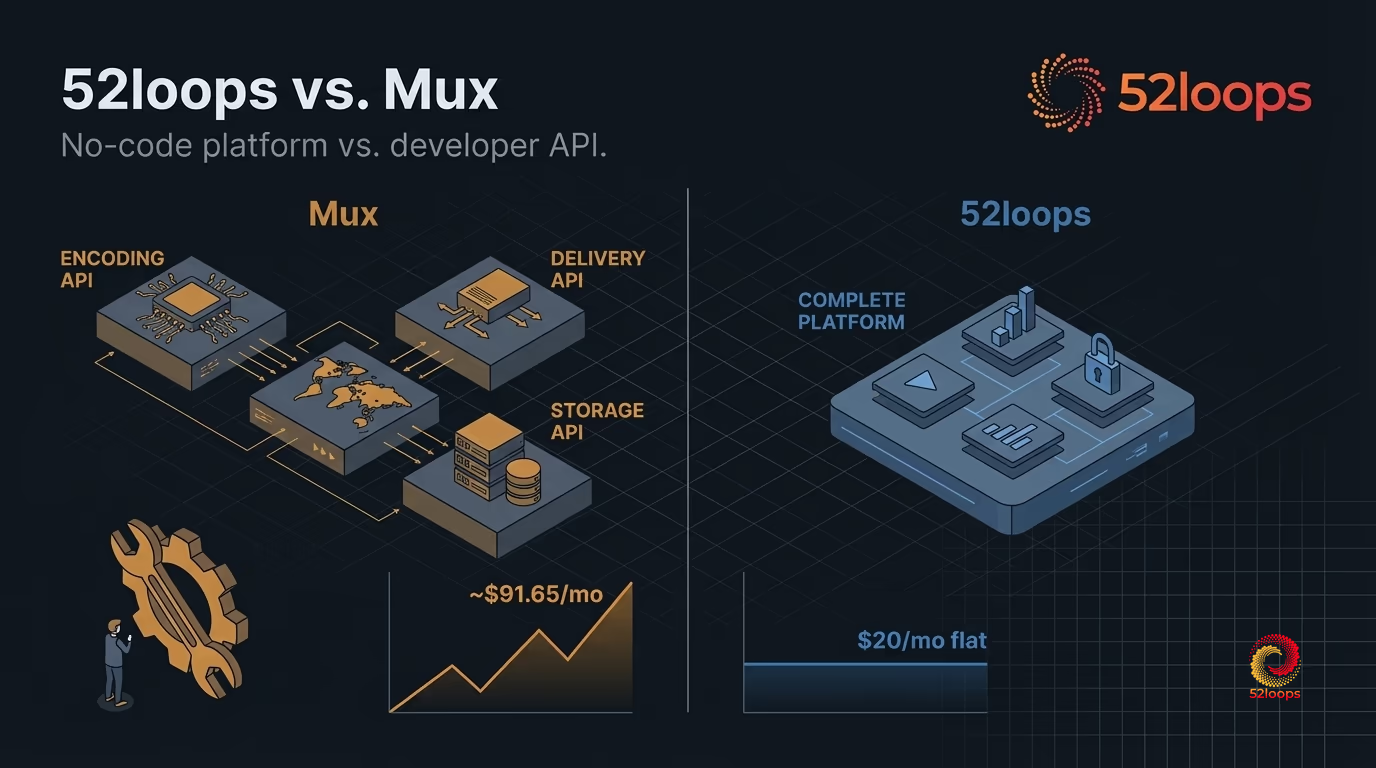
A course creator launches a new module. 200 students watch an average of 3 GB of video during the launch week. According to Mux’s published pricing, that delivery alone costs $90 (600 GB x $0.15/GB). Add encoding for 120 minutes of uploaded content at $0.0075/minute ($0.90) and storage for 50 GB at $0.015/GB/month ($0.75). The Mux bill for that month: roughly $92.
The same month on 52loops: $20, flat. One Highway Unit covers 1 TB of bandwidth and 100 GB of storage, with a Growth Buffer that absorbs traffic spikes without an overage charge. Player, analytics, domain-locking, and access controls are included.
That cost gap matters. But it is not the core story. The deeper question is: are you hiring a video API or a video hosting platform? These are not the same product.
TL;DR: The Short Answer
Mux is infrastructure for engineering teams building video into software products. 52loops is infrastructure for operators running video-dependent businesses without engineering resources.
If you have a developer team and need to embed video natively into a custom application, Mux is the right choice. If you are a SaaS founder, course creator, or training team lead who needs hosted video without writing code, Mux is the wrong hire.
At a Glance
| 52loops | Mux | |
|---|---|---|
| Pricing model | Fixed monthly (Highway Units) | Per-minute encoding + per-GB delivery + per-GB storage |
| Monthly cost estimate | $20/unit (1 TB + 100 GB storage) | ~$92 for 200-student launch month |
| Setup requirement | No code. Upload via dashboard. | Backend API, signed playback tokens, player SDK |
| Bill predictability | Known before the month starts | Known after the month ends |
| Traffic spike handling | Growth Buffer included | Bill scales linearly with traffic |
| Player | Built-in, branded | SDK implementation required |
| Analytics | Dashboard included | Mux Data included; dashboard or API access |
| Access control | Domain-locking built in | Signed tokens require backend implementation |
| Live streaming | Planned (roadmap) | Yes, 4-second latency |
| Target user | Non-developer operators | Engineering teams |
Where Mux Excels: The Honest Assessment
Mux is a genuinely excellent product. Any comparison that dismisses it loses credibility with people who have already done the research.
Developer experience. Mux’s documentation, API design, and SDK coverage are consistently rated among the best in the video infrastructure category. The platform supports 13+ server-side and client-side SDKs and integrations across Node, Python, Go, PHP, Ruby, .NET, React, React Native, iOS, Android, Flutter, SvelteKit, and Next.js. For engineering teams, this breadth removes friction at every stage of implementation.
Per-title AI encoding. Mux uses per-title encoding, which means the encoding ladder (the set of quality levels generated for each video) is optimized individually for each asset. A talking-head tutorial gets a different encoding profile than a fast-motion product demo. The result is better visual quality at lower file sizes compared to fixed-ladder encoding. For teams where video quality is a core product differentiator, this is a meaningful advantage.
Live streaming at scale. Mux supports live streaming at 4-second latency via SRT and RTMP. For organizations running live events, webinars, or real-time training sessions at scale, this is a production-grade capability that most managed platforms do not match.
Mux Data analytics. Mux Data is considered the industry benchmark for video performance metrics. It tracks rebuffering rate, startup time, quality changes, and viewer engagement at a level of granularity that is useful for engineering teams diagnosing delivery problems. The metrics are accessible via dashboard or API.
Mux is the right infrastructure choice when you have a development team and need to embed video natively into a software product. Its strengths are real. The problem is not Mux. The problem is that “video API” and “video hosting platform” describe different products, and they are routinely evaluated as if they occupy the same shelf.
What Mux Requires: The Assembly Cost
Mux’s pricing page shows three numbers: $0.15/GB for delivery, $0.0075/minute for encoding, $0.015/GB/month for storage. Those are the visible costs. The detailed pricing documentation at mux.com/docs/pricing/video explains the model in full.
What the pricing page does not show is the engineering budget required to deploy it.
Backend integration. The Mux upload API requires backend code to create upload URLs, handle webhooks for processing status, and manage asset metadata. Signed playback tokens, which restrict who can view a video, require a backend service to generate and rotate them. Without these, any video URL is publicly accessible to anyone with the link.
Frontend implementation. Mux does not provide a drop-in player with configuration. The Mux Player SDK must be implemented by a developer on the frontend. For teams without a frontend engineer, this is not a configuration task. It is a build task.
No operational dashboard for content managers. Mux has a developer dashboard for monitoring API usage and reviewing assets. It is not designed for a content manager to upload a course module, set access permissions, and review engagement. Those views do not exist out of the box. Building them is additional work.
Ongoing maintenance. SDK version updates, API deprecation notices, webhook endpoint maintenance, and token rotation logic all become recurring operational tasks. For a two-person SaaS team or a solo course creator, this overhead is not abstract. It is hours every quarter.
The per-GB pricing is the visible cost. The engineering budget is the invisible one. A contract developer to build the initial integration typically runs $3,000 to $8,000. Ongoing maintenance adds hours monthly. That budget needs to appear somewhere in the total cost of ownership calculation.
For a deeper look at these kinds of hidden costs across video platforms, see 7 Hidden Fees in Affordable Video Hosting.
The Billing Math: What a Launch Month Actually Costs
The numbers below are sourced from mux.com/pricing.
The scenario: A training team launches a new module. 200 students watch an average of 3 GB of video each during the launch month. The team uploads 120 minutes of new content. Total stored video library: 50 GB.
Mux cost breakdown:
| Line item | Calculation | Cost |
|---|---|---|
| Video delivery (600 GB x $0.15/GB) | 200 students x 3 GB = 600 GB | $90.00 |
| Encoding (120 min x $0.0075/min) | 2 hours of uploaded content | $0.90 |
| Storage (50 GB x $0.015/GB/month) | Current library size | $0.75 |
| Total | $91.65 |
52loops cost breakdown:
| Line item | Cost |
|---|---|
| 1 Highway Unit (1 TB bandwidth + 100 GB storage) | $20.00 |
| Growth Buffer (20% spike protection) | Included |
| Player, analytics, domain-locking | Included |
| Total | $20.00 |
That is a $71.65 difference for a single month. The gap widens as the student base grows. At 1,000 students watching the same 3 GB each, the Mux delivery bill alone reaches $450. The 52loops bill for the same traffic sits at $40 (two Highway Units, covering 2 TB).
Mux’s billing model is designed for engineering teams that can forecast usage and model costs before they occur. For non-developers, the bill is a lagging indicator. You find out what last month cost after the month is over, and you cannot undo bandwidth that has already been delivered.
For a broader look at how overage billing compounds across a growing course library, see the 2026 Guide to Video Hosting Overages. The Growth Buffer model and the reasoning behind reserved-capacity billing is covered in detail in Why We Built a Growth Buffer (Not a Success Penalty).
Pricing: Mux vs. 52loops
The structural difference between these two pricing models is worth naming directly.
Mux uses metered billing. Like a pay-as-you-go phone plan, you pay for what you use. If usage is predictable and you have the engineering capacity to model it in advance, this can be cost-efficient at scale. If usage is unpredictable, a successful launch becomes a billing event. This is the Success Tax in practice: growth that generates revenue also generates an uncapped invoice.
52loops uses reserved-capacity billing. Like a mobile data plan, you purchase a fixed unit of capacity in advance. One Highway Unit = 1 TB of bandwidth + 100 GB of storage per month, for $20. If you approach the limit, a Growth Buffer absorbs the overage. Your plan adjusts at the next billing cycle, not mid-month.
The reserved model means your bill is known on the first day of the month, not the last.
| 52loops | Mux | |
|---|---|---|
| Base unit | Highway Unit ($20/unit) | No base unit |
| Bandwidth included | 1 TB per unit | $0.15/GB |
| Storage included | 100 GB per unit | $0.015/GB/month |
| Encoding | Included | $0.0075/minute |
| Spike protection | Growth Buffer | None (linear billing) |
| Bill timing | Fixed, known in advance | Variable, known after delivery |
| Engineering required | No | Yes |
Complete Platform vs. Developer API: What You Are Actually Buying
This distinction matters more than the pricing comparison.
A video API provides primitives: encoding, delivery, and storage. You assemble the rest. A video hosting platform provides those primitives assembled into an operational product.
Think of it this way: Mux is the engine, the transmission, and the axles. 52loops is the vehicle. An engineering team can build the rest of the car around a Mux engine. A course creator or a training operations lead cannot.
| Capability | 52loops | Mux |
|---|---|---|
| Upload via dashboard | Yes | No (API only) |
| Built-in video player | Yes | SDK implementation required |
| Analytics dashboard | Yes | Mux Data (dashboard or API) |
| Domain-locking | Yes | Signed tokens (backend required) |
| Privacy controls | Yes | Signed tokens (backend required) |
| Access management | Yes | Backend implementation required |
| Embed code (no dev required) | Yes | No |
| REST API for advanced use | Yes | Yes |
| SDK coverage | Embed code | 13+ SDKs and frameworks |
| Live streaming | Roadmap | Yes (SRT/RTMP, 4s latency) |
| Per-title AI encoding | Standard ladder | Yes |
The feature matrix is not the full picture either. Mux Data analytics is excellent, but it is accessed via API or a developer dashboard, not via an interface designed for a content operator reviewing which modules have the highest drop-off rate.
For teams where video is a product feature managed by engineers, Mux’s control surface is an asset. For teams where video is content managed by operators, it is a mismatch.
If you are evaluating platforms more focused on marketing-led video features, 52loops vs. Wistia covers that comparison. If raw CDN and API delivery tools are on your shortlist alongside Mux, 52loops vs. Bunny.net covers the same “assembled platform vs. raw infrastructure” distinction with a different competitor.
Who Should Use Each Platform
Choose Mux if:
- You have a backend and frontend engineering team building video as a native feature of your software product.
- You need maximum control over encoding parameters, player behavior, and delivery logic.
- Live streaming is a core requirement, at scale, with low latency.
- You are building at a level where per-title encoding quality differences are measurable and matter to your users.
- Your team has the capacity to maintain SDK integrations, token rotation, and API versioning over time.
Choose 52loops if:
- You are a SaaS founder, course creator, or training team lead without engineering resources.
- You need video hosting operational from day one, without building the player, the access controls, or the analytics integration.
- Predictable, fixed monthly costs are a requirement for your budget process.
- You want a bill that is known before the month starts, not after it ends.
- Traffic spikes from launches or promotions should not create surprise invoices.
For a broader view of which platforms suit different course creator needs, see Top 8 Video Hosting for Course Creators 2026.
The Jobs-to-Be-Done framing is the most useful lens here. People who use Mux have hired it to do a specific job: “Build custom video into my application without managing encoding infrastructure.” People who use 52loops have hired it for a different job: “Host my course or training content reliably without writing code.” These are not the same job. Evaluating them as if they are leads to the wrong hire.
How to Migrate from Mux to 52loops
If you are currently on Mux and the engineering overhead or billing unpredictability is the driver for looking at alternatives, migration is straightforward.
Step 1: Export your video assets from Mux. Use the Mux API to retrieve the list of assets and download the master files. Mux provides an asset download endpoint. Your developer (or contractor) can script this export.
Step 2: Create your 52loops account and select your Highway Unit tier. Check your current monthly bandwidth usage from Mux’s usage dashboard to determine how many Highway Units you need. The pricing page shows the per-unit cost at each tier.
Step 3: Upload your video library to 52loops. Upload directly via the 52loops dashboard. No API calls, no encoding configuration. The platform handles transcoding.
Step 4: Replace embed codes. 52loops generates embed codes per video from the dashboard. Replace the Mux Player SDK implementations in your course platform or LMS with the 52loops embed codes.
Step 5: Configure domain-locking and access controls. Set your allowed domains in the 52loops dashboard to lock playback to your course platform. This replaces the signed playback token logic from your Mux integration.
The migration eliminates the backend token service, the player SDK dependency, and the variable billing model in a single transition. Start your free trial to see how the platform is configured for your delivery volume.
Frequently Asked Questions
Is Mux suitable for course creators without a development team?
Mux is designed for engineering teams building video natively into software products. Deploying Mux without a development team requires contracting a backend engineer to integrate the upload API and signed playback tokens, a frontend developer to implement the Mux Player SDK, and ongoing maintenance for SDK updates and API versioning. The per-GB and per-minute costs on Mux’s pricing page are only the visible line items. The engineering budget is the invisible one. For course creators and training teams without technical resources, 52loops provides a complete platform with upload, player, analytics, and access controls, without any code required.
How does 52loops pricing compare to Mux for video hosting?
Mux uses metered billing: $0.15/GB for video delivery, $0.0075/minute for encoding, and $0.015/GB/month for storage (published at mux.com/pricing). A course creator with 200 students watching 3 GB of video each in a launch month pays roughly $92 for delivery, encoding, and storage alone, before any engineering costs. 52loops uses reserved-capacity billing: one Highway Unit ($20/month) covers 1 TB of bandwidth and 100 GB of storage, with a Growth Buffer that absorbs traffic spikes. The same launch month on 52loops costs $20, flat. The structural difference is timing: on Mux, the bill is a lagging indicator known after the month ends. On 52loops, the cost is fixed before the month starts.
What does Mux charge per GB for video delivery?
According to Mux’s published pricing at mux.com/pricing, Mux charges $0.15/GB for video delivery on the first 500 GB per month, with volume discounts at higher tiers. Encoding is billed at $0.0075/minute of uploaded content. Storage is $0.015/GB/month. For teams where delivery volume is predictable and an engineering team manages the integration, this model can be cost-efficient at scale. For non-developer teams, the variable billing and assembly cost make Mux significantly more expensive in practice than the per-GB rate suggests.
What is the difference between a video API and a video hosting platform?
A video API (such as Mux) provides infrastructure primitives: encoding, delivery, and storage. The API handles the components, but you are responsible for assembling the rest: the player, the access controls, the analytics interface, and the upload workflow. A video hosting platform (such as 52loops) provides those primitives assembled into an operational product. Upload, player, analytics, domain-locking, and access controls are included and ready to use without writing code. For teams without engineering resources, a video API is not cheaper; it is more expensive once the assembly cost is included.
Can you use Mux without coding?
Mux is designed as a developer API and cannot be used as a no-code video hosting platform without engineering work. At minimum, deploying Mux requires backend code to create upload URLs via the Mux API, handle webhooks for asset processing status, and generate signed playback tokens to restrict video access. The Mux Player must be implemented by a developer on the frontend. Mux does not provide a dashboard for content managers to upload videos, set access permissions, or review engagement. Those views require custom development. For non-developers who need video hosting without coding, 52loops provides a complete dashboard-based platform where upload, player configuration, domain-locking, and analytics are operational without any engineering work.