
You just finished a $50,000 marketing campaign. Your landing page is polished, your copy is tight, and your offer is crystal clear. A potential customer lands on your pricing page, clicks play on your product demo, and…
They see a 15-second unskippable ad for your direct competitor.
This is not a hypothetical scenario. This is happening right now to businesses across the internet, every single day. And the worst part? Most of them have no idea their video infrastructure is actively working against them.
Video infrastructure should be the most stable part of your stack. For many new businesses, YouTube is the default choice for video hosting. It is free, familiar, and easy to use. You create an account, upload your video, grab the embed code, and paste it into your website. Done.
But as your business grows, that “free” platform starts to carry a very high hidden cost. You are not the customer. You are the product being sold to advertisers. And that fundamental misalignment between YouTube’s business model and your business goals is costing you conversions, credibility, and customers. The same logic applies to other free tools many businesses reach for, including Google Drive, which carries its own set of structural risks when used as video infrastructure.
YouTube is a social media network designed to keep viewers on YouTube. It is not an enterprise infrastructure solution designed to keep viewers focused on your product. If you are using YouTube to host your sales demos, course content, or SaaS onboarding videos, you are bleeding conversions without even realizing it.
Here are five signs it is time to transition to a professional Infrastructure Anchor .
The Illusion of Free Hosting
When you use YouTube for business hosting, you are not the customer. You are the product. The platform’s goal is to maximize ad revenue and engagement for its own network, not to ensure your user has a calm, distraction-free experience.
This is not a criticism of YouTube as a platform. YouTube is exceptional at what it was designed to do: entertain, engage, and keep people watching. But what makes YouTube brilliant for entertainment is precisely what makes it dangerous for business.
Every design decision YouTube makes optimizes for watch time and ad engagement. Every algorithm tweak prioritizes keeping viewers in the ecosystem. Every feature serves the goal of monetization through advertising. None of these goals align with helping you close a sale, onboard a customer, or deliver course content.
The math is simple. YouTube earns approximately $30 per user per year from advertising. Your business earns significantly more from each converted customer. When you host critical business content on a platform optimized for advertising revenue, you are optimizing for the wrong outcome.
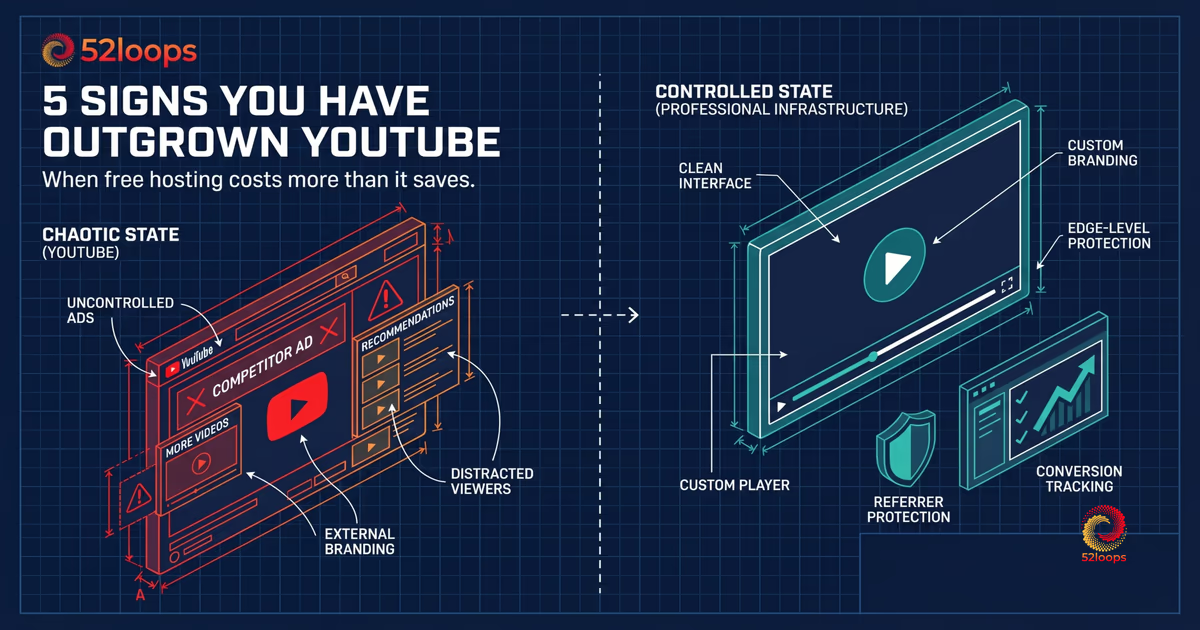
Sign 1: Competitor Ads Are Playing Before Your Demo
The most obvious sign you have outgrown YouTube is when a potential customer clicks your pricing page video, and they are forced to watch a 15-second unskippable ad from your direct competitor.
This is the definition of operational instability. Your video hosting should never actively sell against you.
The scenario plays out like this. A prospect is comparing your product against a competitor. They land on your pricing page to learn more. They click your demo video, expecting to see your product in action. Instead, they watch an ad explaining why your competitor is better. The cognitive dissonance is immediate and damaging.
Video abandonment rates increase by up to 35% when users encounter pre-roll advertising (source). When that ad is for a competitor, the damage is compounded. You have paid for the traffic. You have built the landing page. You have created the demo. And YouTube is using all of that work to promote your competitor.
This is not an edge case. It happens thousands of times per day across businesses using YouTube for hosting. The solution is simple: your video player should only ever play your content.
Sign 2: The Recommendation Trap
When your video ends, YouTube does not want the user to go back to reading your sales page. It shows a grid of “Related Videos” designed to pull them down a rabbit hole of engagement.
If your goal is to guide a user through a checkout flow or a training module, a grid of distracting thumbnails is a conversion killer.
The psychology is straightforward. YouTube’s algorithm surfaces videos based on watch time and engagement potential, not relevance to your content. A customer watching your SaaS demo might see recommendations for entertaining but irrelevant videos: funny cat compilations, trending music videos, or competitor content that happens to generate more watch time.
Each click on a recommended video is a click away from your conversion funnel. Each thumbnail your customer sees is a micro-decision point where they might abandon your journey. You have spent considerable effort getting them to this moment, and YouTube is actively working to pull them away.
This is particularly damaging for course creators and educators. If you are delivering a training module and a student finishes a lesson only to be greeted by a grid of unrelated content, the learning experience is fragmented. Attention is broken. The intentional journey you designed is interrupted by an algorithm optimizing for engagement, not education.
Sign 3: Loss of Brand Control
A YouTube embed looks like a YouTube embed. It carries the red play button, the YouTube logo, and the familiar interface. While this is fine for a vlog, it undermines the perceived value of a premium SaaS product or a high-ticket course.
Professional video hosting allows you to customize the player to match your brand colors, creating a seamless, high-trust environment.
Brand consistency is not a vanity metric. It is a trust signal. When a customer sees your website, your emails, your logo, and your video player all working together in a cohesive visual language, they perceive professionalism and attention to detail. When they see a YouTube player interrupting that experience, the effect is jarring.
Consider the experience difference. A potential customer lands on your premium course sales page. The design is sophisticated, the typography is careful, and the value proposition is clear. They click play on a sample lesson, and a bright red YouTube play button appears in the corner. The YouTube watermark is visible in the corner. The player skin is instantly recognizable as YouTube.
Contrast this with a custom video player that matches your exact color palette, uses your custom typography, shows no external branding, and loads instantly without YouTube’s interface. The perceived value of your course increases. The trust in your brand deepens. The experience feels premium.
Multiple design studies on visual consistency across touchpoints show it increases conversion rates. Research shows consistent branding can lead to up to 23% revenue increase (source), and brands with consistent visual identity enjoy approximately 33% higher brand recall (source).
Sign 4: You Cannot Protect Exclusive Content
If you are selling a course or hosting private internal training, YouTube’s “Unlisted” feature is not actual security. Anyone with the link can share it, and the video can still be downloaded or embedded on unauthorized sites.
Professional infrastructure provides Edge-level Referrer Protection, ensuring your videos can only be played on the domains you explicitly authorize.
This is a critical consideration for businesses monetizing content. When you sell a course for $500, $1,000, or $10,000, you are licensing access to intellectual property. That intellectual property has value, and protecting it is not optional.
YouTube’s unlisted setting provides obscurity, not security. Anyone with the link can share it. Anyone with basic technical knowledge can download the video. The video can be embedded on unauthorized websites. You have no control over where your content appears or who watches it.
Contrast this with proper content protection. Edge-level referrer protection works at the CDN level to verify that a request is coming from an authorized domain. If someone tries to share your video link on a forum, the player simply will not load. The protection is automatic, permanent, and invisible to legitimate viewers.
For internal training, the stakes are equally high. If you are onboarding employees with proprietary processes, product knowledge, or competitive strategy, you need to ensure that content does not leak. YouTube was never designed for enterprise content protection. It was designed for public sharing.
Sign 5: Analytics That Serve Advertisers, Not You
YouTube analytics are designed to help creators make more viral videos. They focus on impressions, click-through rates, and algorithmic reach. As a business, you need operational analytics. You need to know if a specific user finished the onboarding video, or exactly where viewers drop off during a sales pitch.
The metrics that matter to YouTube and the metrics that matter to your business are fundamentally different. YouTube wants to know how many people watched, how long they watched, and whether the video generated engagement. These are metrics optimized for ad revenue.
Your business needs to know different things. You need to know which leads watched your product demo and for how long. You need to know where customers drop off in your course content. You need to know whether your onboarding videos are actually helping users succeed. You need to know if a specific enterprise prospect watched your pitch video and what sections they replayed.
This data difference is not minor. It is structural. YouTube’s analytics are designed to help you create more content that performs well in their algorithm. Your analytics should help you optimize your business processes.
With proper video infrastructure, you can track individual viewer behavior, create funnel analysis, measure conversion impact, and integrate video data with your CRM. You can answer questions like: “Which leads watched more than 50% of our demo?” or “Which course students completed module 3 but dropped at module 4?”
This operational visibility is essential for mature businesses. It is impossible to optimize what you cannot measure, and YouTube is measuring the wrong things.
The Cost of Free
You might be thinking: YouTube is free, and professional video hosting costs money. Here is the reality.
The average business spends between $500 and $2,000 per month on YouTube ads to drive traffic to their website. You spend significantly more on landing page design, copywriting, and conversion optimization. You spend on email automation, CRM systems, and sales training.
Yet the final touchpoint, the video that determines whether a prospect converts, is held on a platform that actively works against your interests.
The real question is not whether you can afford professional video hosting. The real question is whether you can afford to keep using a platform that costs you customers.
If you are generating $10,000 per month in revenue from video-assisted conversions, a single lost customer per month pays for professional hosting. If you are selling a $2,000 course and one pirate sharing your content costs you a single sale, that pays for hosting. The math is not complicated.
Free is never actually free. You are paying with your brand, your data, your conversions, and your customer experience.
Making the Switch
Transitioning from YouTube to professional video hosting is not as difficult as you might expect. Most platforms offer simple embed code replacement. Your videos remain intact. Your URLs can be preserved with proper redirects.
The real barrier is psychological. You have used YouTube for years. It feels comfortable. It feels free. But comfort is not strategy, and what feels free is rarely actually free.
When you upgrade to a dedicated infrastructure provider like 52loops, you regain control over your brand, your audience’s attention, and your operational clarity. Your video player becomes an asset, not a liability. Your analytics become actionable. Your content becomes protected.
The businesses that make this transition first gain a significant competitive advantage. They have better conversion rates. They have stronger brand perception. They have data that drives real business decisions.
The question is not whether you have outgrown YouTube. The question is how long you will wait before acting on what you already know.
Frequently Asked Questions
Every video you upload is processed into multiple resolutions (320p, 720p, and 1080p). We use HLS (HTTP Live Streaming), which allows the player to be smart: if a viewer is on a patchy mobile connection, it stays smooth at 320p; if they have fiber, it looks crisp at 1080p.
I have intentionally avoided 4K. From a First Principles perspective, 4K file sizes lead to slower load times and higher costs that don't add much value for a coaching call or a sales demo.
Yes. Because we are built on a Global Edge Network, your Loops are cached in data centers all over the world. If your viewer is in London, they get the signal from a server just a few miles away rather than waiting for it to travel from New York. This keeps latency low and ensures the video starts almost the moment they hit play.
Absolutely. A video should feel like a natural part of your site, not an ad for a hosting company. You can strip away the "Powered by" badges and customize the player colors to match your frequency. We focus on clean embeds and fast loading times.
By default, the player is designed for streaming, not downloading. I've removed download buttons to keep your Loops within the circuit you've created. While a very technical user can "rip" almost any video on the web, 52loops makes it difficult enough that the average viewer stays within the player.