
You spent six months building your course. Recorded each module. Edited the footage. Wrote the workbook. Priced it at $497 through a calculator that made you feel slightly sick. Your first cohort enrolls.
Then one morning you find a Reddit thread. Someone posted a direct link to your video files. A hundred people have already watched them for free. You are not the first course creator this has happened to, and you will not be the last.
A 2026 Statista Consumer Insights survey reported that 37% of US respondents had accessed paid content without paying, with nearly half of Millennials and Gen Z admitting to it in the prior three months. Most course theft does not involve hackers breaking into servers. It involves legitimate students sharing what they have access to. They do not see it as theft.
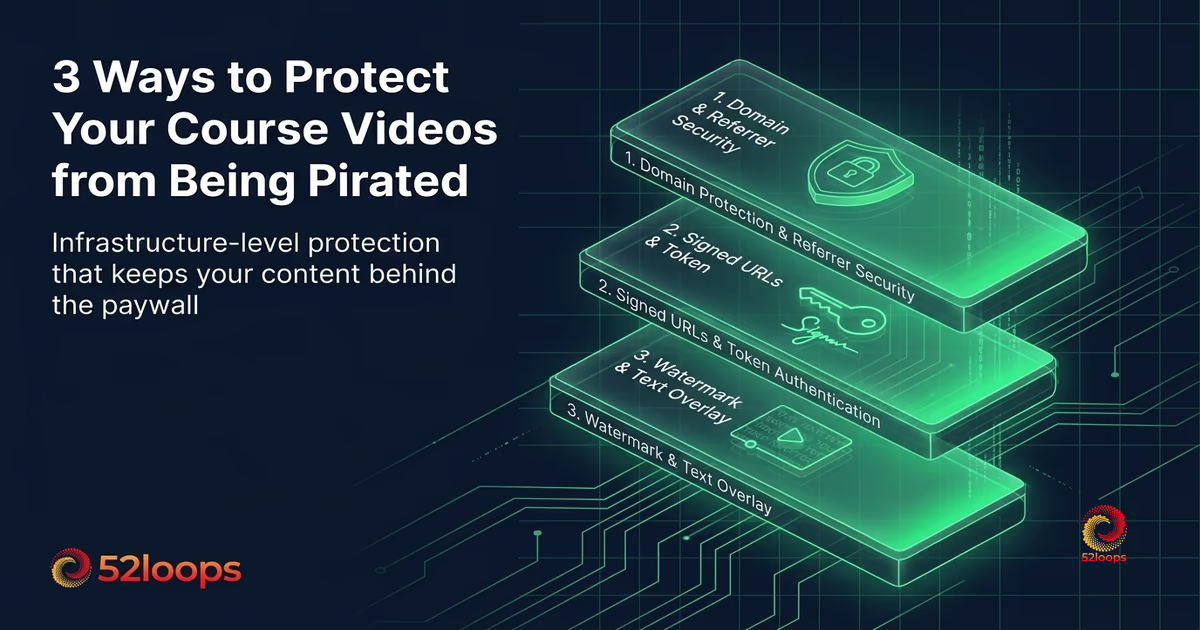
The goal is not to make your course unhackable. No system can guarantee that. The goal is to raise the friction high enough that the casual sharer moves on, while keeping the experience seamless for everyone who paid. This guide covers three infrastructure-level methods that work together. You do not need to be technical to use them, and your students will never notice they exist. If you are evaluating video hosts for your course content, the guide to the best video hosting for course creators in 2026 covers which platforms support these protection methods.
Method 1: Domain Locking (Referrer Protection)
Domain locking is the lowest effort, highest impact protection you can enable. It works at the CDN level. Every request to play a video must come from a page on your domain. If someone copies your embed code and pastes it into a forum post, the video simply does not load.
Most course platforms use this, and for good reason. It stops the majority of casual piracy with zero configuration required from your students. They watch the video normally. They never know the protection exists. It is invisible.
How Domain Locking Works
When a student loads a page on your course platform, their browser requests the video from your CDN. Domain locking checks the HTTP Referer header of that request to confirm it matches your authorized domain. If the request comes from yourcourse.com/lessons/module-1, the check passes. If it comes from reddit.com/r/course-piracy, the CDN returns an error instead of the video.
The check happens at the edge, before the video data leaves the CDN. The unauthorized request never reaches your origin server. It burns no bandwidth. You are not paying for the pirate’s viewers because the CDN refuses the request at the first hop.
Most unauthorized sharing of course content happens through direct link sharing. A student copies the video URL or embed code from the page source and posts it somewhere public. Domain locking makes that specific attack vector non-functional. The link exists, but it leads to a blank player.
What Domain Locking Does Not Do
Domain locking has two important gaps.
First, it checks the Referer header, and that header is not always sent. Some privacy-focused browsers and extensions strip it by default. Legitimate students using these tools may see a broken player. A good implementation handles this by allowing requests with missing Referer headers to pass through. This means domain locking relies on the Referer being honest when it is present, which is most of the time but not all of the time.
Second, domain locking cannot prevent a determined user from downloading the video during playback and re-uploading it elsewhere. If someone can see the video on their screen, they can record it with screen capture software. Domain locking prevents hotlinking your CDN directly. It does not prevent a student from re-recording your content.
For most course creators, this gap is acceptable. The goal is not to stop a determined reverse engineer. It is to prevent the casual copy-paste sharing that accounts for the vast majority of content theft. Domain locking addresses that effectively and requires no technical effort from your students. The same principle applies to preventing bandwidth theft from hidden overages: the most effective protection works at the infrastructure layer, invisible to your legitimate users.
Method 2: Signed URLs (Token Authentication)
Signed URLs add an authentication layer to every video request. Instead of the video living at a fixed URL, each student gets a unique, time-limited URL generated dynamically when they log into your course.
The URL contains a cryptographic signature that proves the request is authorized. If that URL is shared, the signature expires after a set time window, typically a few hours, and the link stops working. The recipient sees a blank player or an authorization error.
How Signed URLs Work in Practice
When a student logs in and clicks a video lesson, your backend generates a signed URL for that specific video, for that specific user, with an expiration timestamp. The URL looks something like cdn.yourhost.com/videos/module-1.mp4?expires=1715123456&signature=abc123def456.
The signature uses a secret key that only your server knows. The CDN verifies the signature against the expiration time before serving the video. If the signature is invalid or the timestamp has passed, the request is denied.
Even if a student inspects the page source and copies the video URL, sharing it is useless after a few hours. The recipient gets a broken link. If the student shares it immediately, the recipient gets a few hours of access, but the window is narrow enough that organized piracy becomes impractical.
For course platforms, the typical expiration window is between 1 and 24 hours. Shorter windows offer more protection but require the student to refresh more often. A 12-hour window covers a full day of study while limiting damage from a leaked link.
The Tradeoff: User Experience vs. Security
Signed URLs are more secure than domain locking, but they introduce an operational requirement. Your backend must generate them dynamically. Every video request goes through an authentication check, which adds latency to the first playback.
If you use an all-in-one platform like Teachable, Thinkific, or Kajabi, signed URLs are handled automatically. You do not need to implement them. The platform generates signed tokens behind the scenes and manages expiration windows.
For self-hosted setups using WordPress with a membership plugin, signed URLs require either a plugin that supports them or a custom integration with your video host’s API. Some video hosts offer signed URL support as a built-in feature, which avoids the performance overhead of video plugins entirely. Others require you to build the signing logic yourself.
The important distinction: signed URLs operate at the delivery layer. They do not replace your existing authentication system. They add a second check at the CDN level. A student must be logged into your course to get a signed URL, and the URL itself expires on a timer. Two independent barriers instead of one.
Method 3: Watermarking
Watermarking adds a visible identifier to the video during playback. Usually the student’s name, email, or username overlaid on the content. If a recorded version appears on a piracy site or social media, the watermark identifies which student leaked it.
The deterrence value is often higher than the technical protection. A student who knows their name appears on every frame is less likely to screen-record and share. The risk of being caught shifts the calculation from “I can share this anonymously” to “I might get caught.”
Watermark Types and Tradeoffs
Two approaches to watermarking, and they differ in complexity and security.
Static watermarks are overlaid by the player during playback. The player reads the student’s name from an API response and renders it as a semi-transparent text overlay on the video. Generated in real time, no effect on the underlying file.
The advantage is simplicity. No pre-processing of video files needed. Each student sees their own watermark without individual copies of every video. The overhead is minimal because the player renders the overlay locally.
The disadvantage is that a technically savvy student can remove them. If the watermark is rendered by the player in the browser, someone who downloads the raw video stream with developer tools gets the video without the overlay. Static watermarks deter the casual sharer but do not survive a determined extraction.
Dynamic forensic watermarks embed identifying information directly into the video stream at the server level. Each student receives a slightly different version of the video with imperceptible encoding variations. These are not visible to the human eye but can be detected analytically. If a leaked copy appears online, the host can analyze the encoding artifacts to identify the source.
The advantage is durability. Forensic watermarks survive re-encoding, screen recording, and compression. The data is in the video content itself, not in a player overlay.
The disadvantage is cost. Generating individualized video streams for each student at playback time requires significant processing power. Most video hosts do not offer forensic watermarking as a standard feature because of the computational expense. It is typically available only in enterprise-grade DRM solutions.
For most course creators, static watermarking is the practical choice. It provides genuine deterrence without the infrastructure overhead. Students know their name is visible, which changes their behavior, and that behavioral change is the primary protection mechanism. If you are on a platform with variable bandwidth billing, zero-egress architecture eliminates the overage bill so piracy does not become a double cost: the stolen views and the surprise invoice.
Layering the Three Methods
Each method covers a different attack vector. They work best together.
Domain locking prevents direct link sharing. A student cannot copy the video URL from your course and post it on a forum for anyone to watch. The CDN rejects the request because the referrer does not match.
Signed URLs add an expiration window. Even if the domain check is bypassed or a student captures the URL within an authorized context, the link expires after a set period. Bulk sharing becomes impractical because every shared link has a limited shelf life.
Watermarking creates accountability. A student considering screen recording knows their identity will be visible in any leaked copy. The deterrence effect reduces the pool of would-be pirates before they attempt to bypass the first two layers.
A course protected by all three methods has no single point of failure. If the domain lock is bypassed by a Referer-spoofing tool, the signed URL still expires. If the signed URL is captured before expiration, the watermark identifies the leaker. The layers compensate for each other’s weaknesses.
The Reference Table
| Method | What It Stops | What It Does Not Stop | Implementation Effort | Student Impact |
|---|---|---|---|---|
| Domain Locking | Direct link sharing, hotlinking | Screen recording, downloaded files | Low (host config) | None |
| Signed URLs | Shared links after expiration | Links shared within the window | Medium (API integration) | Adds slight latency |
| Watermarking | Casual screen recording | Professional extraction | Low to High (depends on type) | Visual overlay (static) |
What About DRM?
Digital Rights Management systems like Widevine, PlayReady, and FairPlay encrypt the video stream and require a secure player to decrypt it. In theory, DRM is the strongest form of video protection. In practice, its effectiveness depends heavily on the platform ecosystem.
If you use a major learning platform, the platform handles DRM if they support it. For self-hosted courses, implementing DRM requires licenses, secure player integration, and ongoing maintenance. The operational overhead is significant, and the incremental protection over the three-method stack is marginal for most use cases.
DRM makes sense for high-stakes content like pre-release training materials, certification exam prep, or licensed content where a single leak carries substantial financial risk. For a typical $200 to $1,000 online course, the cost of implementing and maintaining DRM often exceeds the expected loss from piracy. The three-method stack provides adequate protection at a fraction of the complexity. For broader infrastructure context, see the 2026 guide to video hosting overages, which covers the cost layer that interacts with security choices.
Why Most Course Piracy Happens at the Sharing Layer
Back to the survey statistic: a meaningful share of digital piracy involves legitimate users sharing access rather than technical attacks. As Corsearch’s 2026 state of online piracy report notes, the demographic has expanded well beyond cash-strapped college students into older generations and full households. This reframes the problem. You are not defending against anonymous hackers. You are defending against your own students who see no harm in sharing a link with a friend.
A student who paid $497 for a course might share the login with a coworker because the course feels overpriced, because they want to help someone, or because they do not consider link sharing to be theft. The security stack cannot address the motivation, but it can make the action non-functional.
Domain locking makes the shared link useless. Signed URLs make it temporary. Watermarking makes it traceable. Individually, each method is leaky. Together, they create a consistent message: this content is monitored, protected, and attributable to the account that accessed it.
Frequently Asked Questions
A CDN (Content Delivery Network) is delivery infrastructure. It moves files from servers to viewers quickly, using a global network of edge nodes. Bunny.net, Cloudflare, and AWS CloudFront are CDNs.
A video platform is a complete product built on top of delivery infrastructure. It includes the player, transcoding pipeline, domain-locking, analytics, and support, assembled and maintained so you do not have to.
52loops is a video platform. It uses a CDN (Cloudflare's global edge network) as part of its infrastructure, but the CDN is one component among several, not the product itself.
The distinction matters for cost estimation. A CDN price covers delivery only. A video platform price covers delivery plus everything required to make delivery work reliably for non-technical operators.
I use a "Referer check" - a digital bouncer for your content. When you embed a Loop, the platform checks exactly where that request is coming from. If someone tries to post your video link on a public forum, the circuit breaks and the video won't play. It's a high bar that stops the vast majority of "hotlinking" that would otherwise drain your bandwidth.
Absolutely. A video should feel like a natural part of your site, not an ad for a hosting company. You can strip away the "Powered by" badges and customize the player colors to match your frequency. We focus on clean embeds and fast loading times.
By default, the player is designed for streaming, not downloading. I've removed download buttons to keep your Loops within the circuit you've created. While a very technical user can "rip" almost any video on the web, 52loops makes it difficult enough that the average viewer stays within the player.